
CN-Wheat User Guide#
Introduction#
CN-Wheat is a model simulating the distribution of carbon and nitrogen metabolites into wheat plants described at organ level. Shoot organs are represented as a set of laminae, sheaths and internodes, while the root system is represented as a single compartment. For each organ, CN-Wheat considers structural material, mobile metabolites (amino acids, nitrates and sucrose) and storage metabolites (proteins and fructans). Synthesis, degradation and transport of the different metabolites are simulated for each compartment according to the local metabolite concentration and the local environment (mainly light, temperature, CO2, soil N). CN-Wheat represents these flows as a set of differential equations which are solved at each time step (hourly) assuming a constant plant architecture. CN fluxes related to organ growth are therefore accounted for in a supplementary models (elongwheat, growthwheat).
Implementation and architecture#
Software design#
Package architecture#
CN-Wheat is a Python package which consists of several Python modules:
openalea.cnwheat.model: the state and the equations of the model,openalea.cnwheat.parameters: the parameters of the model,openalea.cnwheat.simulation: the simulator (front-end) to run the model,openalea.cnwheat.postprocessing: the post-processing and graph functions,openalea.cnwheat.tools: tools to help for the validation of the outputs,and
openalea.cnwheat.converter: functions to convert CN-Wheat inputs/outputs to/from Pandas dataframes.
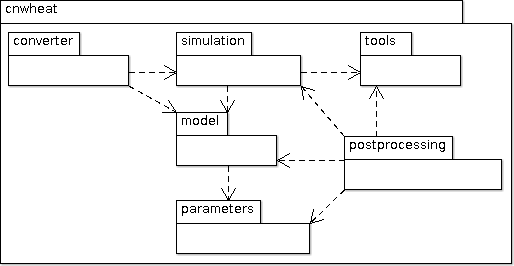
CN-Wheat architecture#
Parameters, variables and equations#
CN-Wheat is defined at culm scale, the crop being represented as a population of individual culms. Culms are considered as a set of botanical modules representing the root system, each photosynthetic organ and the whole grains.
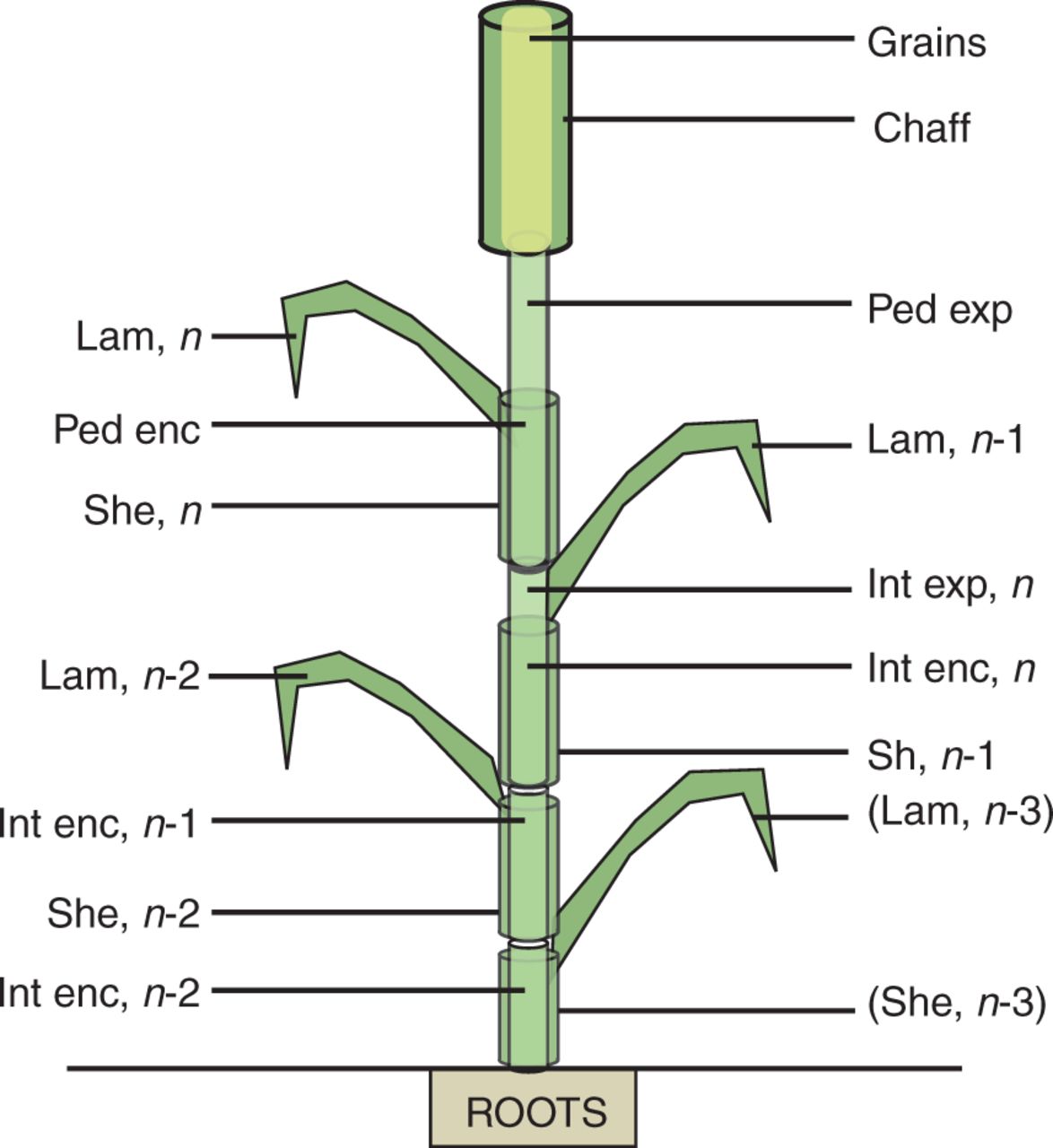
Botanical description of the culm structure of wheat as implemented in the model (Barillot et al., 2016)#
Computationally, the population is described as a composition
of objects, organized in a multiscale tree-like structure:
- a
populationcontains one or severalplant(s), - each
plantcontains one or severalaxis(es), - each
axiscontains: one
set of roots,one
phloem,zero or one
set of grains,- and one or several
phytomer(s); eachphytomercontains: - one
chaff; eachchaffcontains: one exposed
chaff element,and/or one enclosed
chaff element,
- one
- and/or one
peduncle; eachpedunclecontains: one exposed
peduncle element,and/or one enclosed
peduncle element,
- and/or one
- and/or one
lamina; eachlaminacontains: one exposed
lamina element,and/or one enclosed
lamina element,
- and/or one
- and/or one
internode; eachinternodecontains: one exposed
internode element,and/or one enclosed
internode element,
- and/or one
- and/or one
sheath; eachsheathcontains: one exposed
sheath element,and/or one enclosed
sheath element.
- and/or one
- and one or several
- each
- each
- a
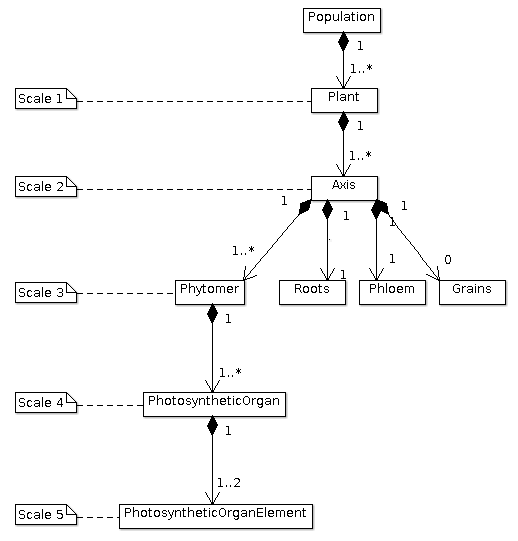
The multiscale tree-like structure of a population of plants#
The nitrate concentration in soil is stored and computed in objects of type cnwheat.model.Soil.
These objects include structural, storage and mobile materials, variations in which are represented by ordinary differential equations driven by the main metabolic activities. Each object consists of different metabolites and is connected to a common pool, the phloem, to allow C–N fluxes.
Thus, each class of cnwheat.model defines:
constants to represent the parameters of the model,
attributes to store the current state of the model as compartment values,
and methods to compute fluxes and derivatives in the system of differential equations.
The parameters of the model are stored in module parameters.
Module parameters follows the same tree-like structure as module model.
Front-end#
Module simulation is the front-end of CN-Wheat, which allows
to initialize and run
a simulation.
At initialization step, we first check the
consistency of the population
and soils given by the user. Then we
set the initial conditions which will be used by the solver.
When we run the model over 1 time step, we first
update the initial conditions.
Then we call the function odeint of the library SciPy
to integrate the system of differential equations over 1 time step.
The derivatives needed by odeint are computed by
method _calculate_all_derivatives.
If no error occurs and odeint manages to integrate the
system successfully, then we update the state of the model setting the attributes of population
and soils to the compartment values returned by odeint, and
we compute the integrative variables of the population.
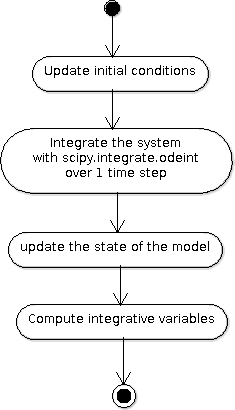
A run of the model#
Module simulation also implements exception handling
logging, and a progress-bar.
Postprocessing, graphs and tools#
After running the simulation over 1 or several time steps, the user can apply postprocessing on
the outputs of the model. These post-processing are defined in module postprocessing, and can be computed
using function postprocessing.postprocessing.
Module postprocessing also provides a front-end to automate the generation of graphs.
These graphs are useful for the validation of the model.
Finally, module tools defines functions to:
plot multiple variables on the same graph,
set up loggers,
check the outputs of the model quantitatively,
and display a progress-bar.
Module converter implements functions to convert
CN-Wheat internal population and
soils to
and from Pandas dataframes.
Here is an activity diagram of this example:
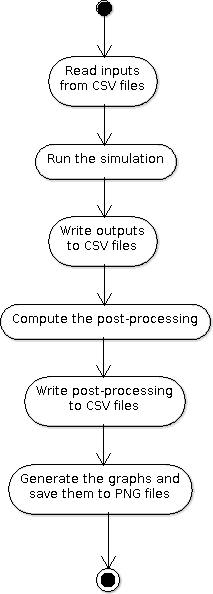
Dataflow of the example#
Constraints on use#
Consistency of the inputs#
The input population given by the user
must the following topological rules:
the
populationcontains at least oneplant,each
plantcontains at least oneaxis,- each
axismust have: one
set of roots,one
phloem,zero or one
set of grains,at least one
phytomer,
- each
- each
phytomermust have at least: one photosynthetic organ, among
chaff,peduncle,lamina,internode, orsheath,or one
hiddenzone,
- each
each
photosynthetic organmust have one enclosed element and/or one exposed element. Elements enclosed and exposed must be of a type derived from classPhotosyntheticOrganElement, that is one ofchaff element,lamina element,internode element,peduncle elementorsheath element. An element must belong to an organ of the same type (e.g. alamina elementmust belong to alamina).
Likewise, the input soils given by the user must
supply a soil for each axis.
These rules prevent from inconsistency in the modeled system. There are checked
automatically at initialization step.
If the population or the soils
breaks these rules, then the simulator raises an exception
with appropriate error message.
Continuity of the model#
To integrate the system of ordinary differential equations (ODE), the function odeint
takes as first parameters a function which computes the derivatives at t0:
dy/dt = func(y, t0, ...)
where y is a vector.
This function is also called RHS (Right Hand Side) function.
In CN-Wheat, the RHS function is defined by the method _calculate_all_derivatives.
If the RHS function has a discontinuity, this may lead to integration failure, the raise of an exception, and a premature end of the execution. A discontinuity in RHS function could be due to the use of inconsistent parameters or to bug(s) in the equations of the model.
If you get a warning of type “ODEintWarning: Excess work done on this call (perhaps wrong Dfun type)”,
you can try to increase the value of ODEINT_MXSTEP defined in the body of the method run.
But you should first enable and check the logs to see if you can settle the problem ahead of the integration.
Sometimes, this warning is just due to a local discontinuity which does not affect the whole result of the simulation.
Inputs and outputs#
The inputs and the outputs of the model consist in state variables describing the state of the population at a given step.
All state variables are defined in the classes of the module cnwheat.model.
At a given step, instances of these classes stored the state parameters and state variables which represent
the state of the system. Metabolic inputs for each compartment are defined in individual csv files located
in the inputs folder of your project.
See module cnwheat.model for a documentation on the inputs and outputs of the model.
Post-processing#
The functions which compute the post-processing are defined in the module cnwheat.postprocessing,
by botanical object.
See module cnwheat.postprocessing for a documentation on the post-processing which can be applied
on the outputs of the of the model.